335P with attachment manager - Joystick layout - How to enable press-buttons and proportional-rollers and label?

Skidsteer Forum - Bobcat, New Holland, Case, John Deere

Help Support Skidsteer:

SkidTracks

Well-known member
Bronze Member
Joined
May 11, 2011
Messages
100
Searching through 335P owner's manual, didn't find anything on how to enable Joystick press-buttons and proportional-rollers. Nor anything on how to label what a press-button does or a proportional-roller does.

The attachment manager has various John Deere attachments (bucket, trencher, snow-blower, backhoe, ...) and option for non John Deere attachment in same category. Depending on attachment, press-button may do something or be flagged as unavailable, same with proportional rollers (of left & right joysticks).

You can add your own attachments, set name for attachment, and depending on base attachment you start from you can modify hydraulic flow (forward/extend) and sometimes flow (reverse/retract), and normal/high pressure. You can look at Joystick press-button and proportional rollers; but I can't find a way to enable or edit names.

Reason I am asking is I have new box blade which has Left side of blades up/down via hydraulic cylinder and Right side of blades up/down via another hydraulic cylinder. But I can't find a built-in type under attachment manager which utilizes Proportional roller of Left Joystick and Proportional roller of Right Joystick.

I would have thought there was some "Blank" type attachment which by default had all press-buttons and proportional rollers enabled. Whereby you would duplicate "Blank" type, giving it a new name and ICON. Followed by editing names of press-buttons and Proportional rollers.

❓Is there a "Blank" type attachment as described above, I missed?

❓Does anyone know how you enable press-buttons and proportional rollers for existing attachment?

❓What about editing press-buttons and proportional rollers from whatever they are called to desired name. For example "Swing Left" or "Function 3" to Left-Up?
 
Searching through 335P owner's manual, didn't find anything on how to enable Joystick press-buttons and proportional-rollers. Nor anything on how to label what a press-button does or a proportional-roller does.

The attachment manager has various John Deere attachments (bucket, trencher, snow-blower, backhoe, ...) and option for non John Deere attachment in same category. Depending on attachment, press-button may do something or be flagged as unavailable, same with proportional rollers (of left & right joysticks).

You can add your own attachments, set name for attachment, and depending on base attachment you start from you can modify hydraulic flow (forward/extend) and sometimes flow (reverse/retract), and normal/high pressure. You can look at Joystick press-button and proportional rollers; but I can't find a way to enable or edit names.

Reason I am asking is I have new box blade which has Left side of blades up/down via hydraulic cylinder and Right side of blades up/down via another hydraulic cylinder. But I can't find a built-in type under attachment manager which utilizes Proportional roller of Left Joystick and Proportional roller of Right Joystick.

I would have thought there was some "Blank" type attachment which by default had all press-buttons and proportional rollers enabled. Whereby you would duplicate "Blank" type, giving it a new name and ICON. Followed by editing names of press-buttons and Proportional rollers.

❓Is there a "Blank" type attachment as described above, I missed?

❓Does anyone know how you enable press-buttons and proportional rollers for existing attachment?

❓What about editing press-buttons and proportional rollers from whatever they are called to desired name. For example "Swing Left" or "Function 3" to Left-Up?
Have you had any luck with this? I'm running into the same issues with my 333p
 
Have you had any luck with this? I'm running into the same issues with my 333p
Never found a way to edit buttons or rollers names. :(

I had to use (+/-) pair of buttons instead of proportional rollers to control box blade.

As John Deere has things setup:
The proportional roller on Right Joy stick controls amount and direction of hydraulic fluid flow. I could not find any pins on attachment connector which were activated by Right Joy stick proportional roller.
The proportional roller on Left Joy stick appears to be electric output to two pins on attachment connector. Moving it does not cause any hydraulic fluid to flow.

I am working on a multi-relay solution to achieve what is best workaround (for me).
Left Joy stick's proportional control will enable the UP/DOWN movement of box blade. Which is done by two hydraulic cylinders, one on left and other on right.
Right Joy stick's (+/-) will disable either Left or Right hydraulic cylinder so box blade can be tilted.
 
Kinda sucks. The layout changes as attachments change. You think there would be a way to set it up the way we want it... There was a Facebook post that guys said it's customizable in the attachment manager, but like you I can't get into it.
 
You cannot edit the joystick layout. You can edit flow and creep.

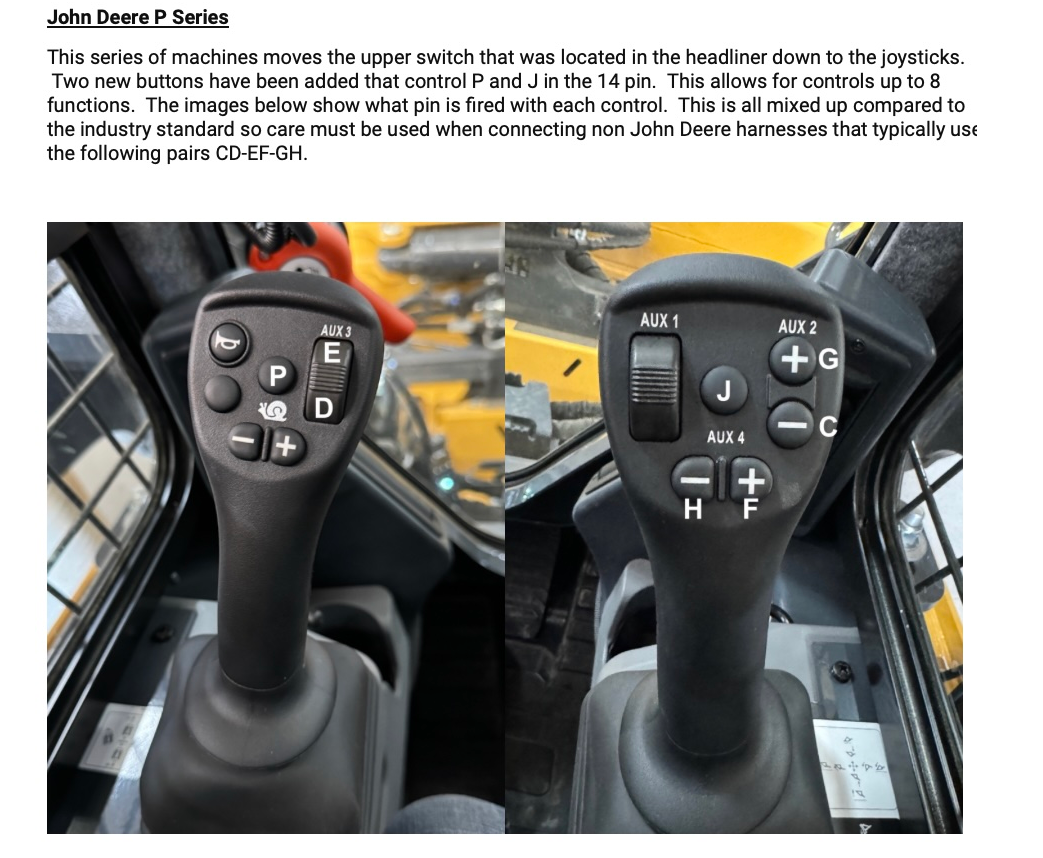
Each joystick button controls a specific pin on the 14 pin connector, which will send power to an electric solenoid that will route the hydraulic flow. You must have hydraulic flow to actually move the implement.

The proportional on the right controls the hydraulic flow (there is no corresponding electric pin on the 14 pin connector). So, in your situation, you have to press the button that controls the solenoid you want to activate and roll the proportional control in the direction you want.

For things like a box blade or 6-way dozer blade, you do not want to use continuous flow. For sweepers, Harley rakes and boom mowers, continuous flow will be on, so all you'll have to do is press the button that activates the solenoid and diverts hydraulic flow to the angle cylinders.

You only wat to "edit" the buttons is by moving the wires in the 14 pin connector to the buttons you want. The manual should have the pin out for the 14 pin connector. It basically is the same on every skidsteer/CTL. You can get the tool to move pins from SSGenius. or an electrical supply house.

I find it easier to setup the wiring on the non-continuous attachments so that I use my right thumb to control the proportional valve and only use the left buttons to move the angle cylinders.
 
This picture is from Skid Steer Genius John Deere P Series FAQ. They mention that JD historically uses pin A for ground instead of pin B like everyone else. It would be worth checking to see if they still do that. If that is the case, then third party attachments that didn't have the harness built for JD won't work until you exchange the A and B pin. Many do that on the machine side.

Have you had the chance to look for the pin out in the JD manual?

1775330931188.png
 

Latest posts

Back
Top